AI Foundations + Shared Vocabulary
41 slides · ← Back to Day 1 · Download .pptx
Day 1 — AI Foundations + Shared Vocabulary
Hands-On SecAI+ · Working Connections 2026 · Mon, Jul 20 · 9:30 AM – 5:30 PM Central
- Domain focus: D1 — Basic AI Concepts (17% of the SecAI+ exam)
- By lunch: you can name the moving parts of a modern AI system
- By end of lab: a local model + working RAG pipeline on your own machine
Speaker notes
Welcome — introductions and housekeeping first. Emphasize the arc of the week: today builds the shared vocabulary every later day depends on. Everything this week runs locally on CPU; no data leaves the laptop, which is itself the security posture we care about.
How this deck works
- Advance with the buttons or the Left / Right arrow keys (Space also advances)
- Checks-for-understanding appear inline — pick an answer, then reveal
- Slides link straight into today's lab when it's time to go hands-on
- This deck is a DRAFT for instructor review
Speaker notes
Give attendees 30 seconds to try the navigation. Mention the speaker-notes toggle exists for instructors reusing this material in their own classrooms.
Today's objectives
- Define core AI/ML terminology: model, training, inference, embeddings, tokens, context window
- Explain how LLMs work at a high level: transformers, attention, autoregressive generation
- Differentiate model types: discriminative vs. generative; LLM vs. SLM
- Demonstrate prompt engineering: zero-shot, one-shot, multi-shot, chain-of-thought, system vs. user roles
- Build a simple RAG pipeline with a local Ollama model and a vector store
- Identify shared vocabulary between AI and cybersecurity domains
Speaker notes
These map 1:1 to the objectives block on the Day 1 page and to SecAI+ domain D1. Flag that every objective gets touched again later in the week — nothing today is throwaway.
Why everything runs locally
- All models run on YOUR machine via Ollama — CPU only, no GPU needed
- No data leaves the laptop: privacy by architecture, not by policy
- Same posture we recommend for low-trust classroom AI tools
- Digest-pinned Docker images: the exact bits we tested are the bits you run
Speaker notes
This is a deliberate security decision, not just a budget one. Local-first means no API keys to leak, no third-party data-processing agreement, and reproducible labs instructors can take home. The cloud VM option exists for 8 GB laptops — same images, same digests.
"AI" is an umbrella
It helps to place today's tools on the map before we zoom in.
- Rule-based / symbolic AI — explicit human-written logic
- Classical machine learning — models that learn patterns from labeled data
- Deep learning — neural networks with many layers
- Generative AI — models that PRODUCE new content; LLMs are the generative-text branch

Speaker notes
Attendees will hear all four terms used interchangeably as 'AI' by vendors and students. The map matters for threat modeling later: each layer has different failure modes and different audit stories.
Rule-based / symbolic AI
- Explicit human-written logic: if/then rules, decision trees written by hand
- Deterministic — same input, same output, every time
- Auditable — you can read exactly why it decided what it decided
- Brittle — breaks on anything the rule author didn't anticipate
Speaker notes
Security folks already live here: firewall rules, IDS signatures, YARA. Determinism and auditability are exactly what we LOSE as we move down the list — worth saying out loud now, it frames the whole governance conversation on Day 3.
Classical machine learning
- Models learn patterns from labeled data instead of hand-written rules
- Classic security examples: spam filters, fraud scoring
- Still relatively small, cheap, and explainable compared to deep learning
Speaker notes
Point out that most deployed 'AI' in security products is still classical ML. It is often the right tool: fast, cheap, and you can inspect feature importance.
Deep learning
- Neural networks with many layers
- The basis for modern language and vision models
- Learns its own internal features — powerful, but far less inspectable
Speaker notes
Bridge slide: deep learning is the substrate; transformers (coming up) are a specific deep-learning architecture that took over language modeling.
Generative AI
- Models that PRODUCE new content: text, code, images
- Large language models are the generative-text branch — the focus of this course
- New capability, new attack surface: the output itself becomes a risk to manage
Speaker notes
Generative output is the thing that makes the OWASP LLM Top 10 (Day 2) necessary — insecure output handling, hallucination, injection all stem from 'the model makes new stuff up.'
Discriminative vs. generative
A useful cut for security work:
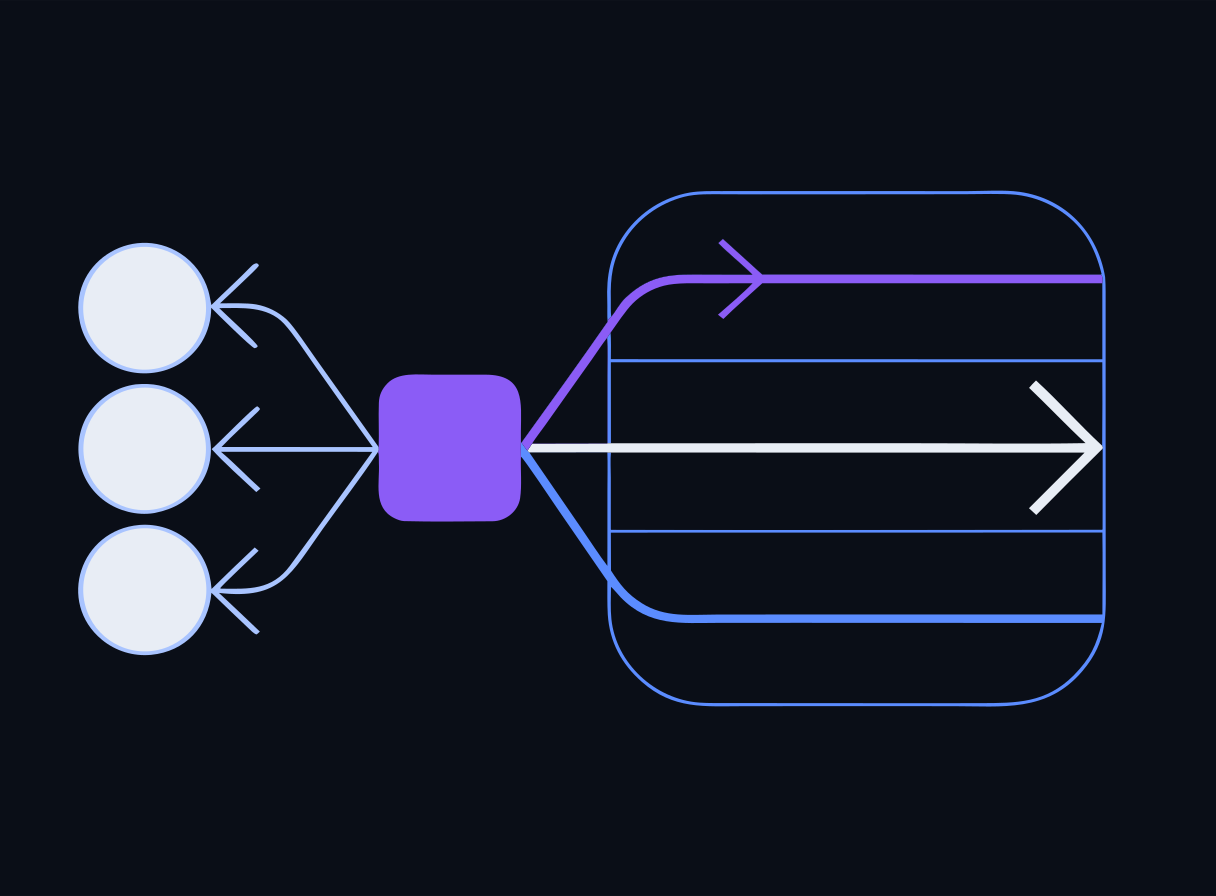
- Discriminative model — answers "which class is this?" (e.g., the DeBERTa prompt-injection classifier you meet on Day 2)
- Generative model — answers "what comes next?" (the LLM itself)
- You will often deploy BOTH: a generative model doing work, a discriminative model guarding it
Speaker notes
This pairing is the architecture of Day 2's guardrail lab: a small discriminative classifier gates input before it reaches the generative model. Cheap classifier in front, expensive generator behind.
Check: model types
Check for understanding
A classifier that labels incoming prompts as 'injection attempt' vs. 'benign' before they reach your chatbot is best described as…
- A.A generative model, because it produces a label
- B.A discriminative model — it answers "which class is this?" rather than generating new content
- C.A rule-based system, because classification is deterministic
- D.A vector database
Reveal answer
Correct: B. A discriminative model — it answers "which class is this?" rather than generating new content
Discriminative models answer 'which class is this?' — exactly what a prompt-injection classifier (like the DeBERTa model on Day 2) does. The LLM behind it is the generative model answering 'what comes next?'
Speaker notes
First check — model the mechanic: pick silently, then reveal. The wrong answer to watch for is A; students often think 'it outputs something, so it's generative.' Emphasize the question each model type answers.
LLM vs. SLM — same idea, different scale
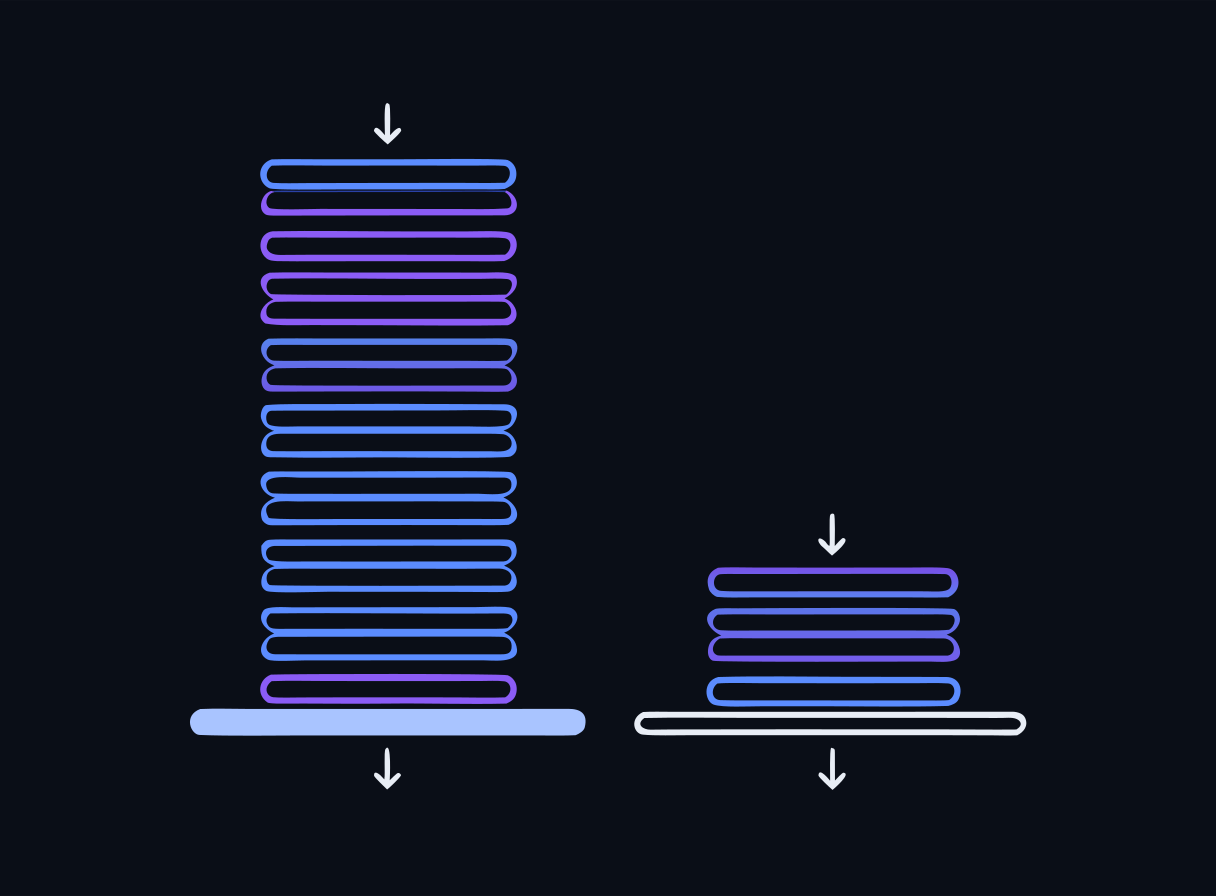
- LARGE language models: frontier scale, hundreds of billions of parameters — broad reasoning and recall, serious hardware
- SMALL language models: 1–3B parameters (like qwen2.5:1.5b) — fit in laptop RAM, run on CPU
- Both are typically decoder-only transformers — the architecture is the same, the scale is not
- Trade-off: SLMs give up some reasoning and world knowledge for portability and privacy
Speaker notes
The defining axis is parameter count, not architecture. This is also a recurring design theme: choose the smallest model that reliably does the job. Foreshadow Day 4, where tool-calling reliability forces us up from 1.5B to a 3B model.
Why small models for this workshop
- qwen2.5:1.5b — the workhorse: fast enough on CPU for interactive labs
- qwen2.5:3b — used on Day 4 when tool calling needs more capability
- nomic-embed-text — the embedding model behind today's RAG lab
- Everything pre-staged and pinned: no downloads during the lab
Speaker notes
Set expectations: a 1.5B model will make mistakes a frontier model wouldn't. That is pedagogically useful — failure modes are visible, and the security lessons transfer directly to bigger models.
Core vocabulary: model, training, inference
- Model — the artifact: an architecture plus learned weights
- Training — the (expensive, offline) process that sets those weights from data
- Inference — using the trained model to produce output; what we do all week
- In this workshop we only do inference — nothing we type retrains the model
Speaker notes
Common student misconception: 'the model learns from my chats.' In our stack it never does — weights are frozen at inference time. Anything that looks like memory is context, which is exactly why context is the attack surface.
How a language model actually works
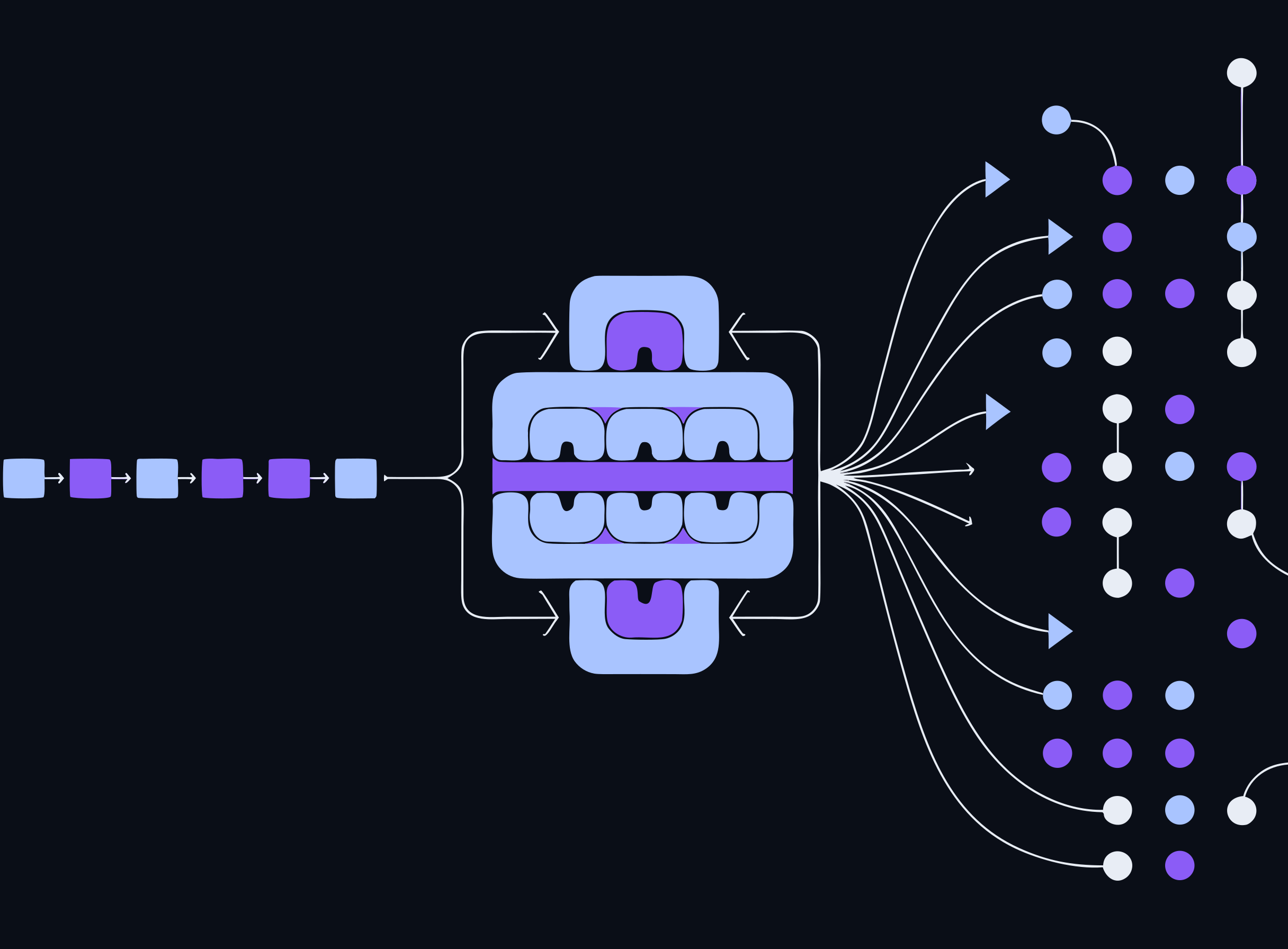
Modern LLMs are transformers. Three ideas are enough to reason about them securely:
- Tokens — the units the model reads and writes
- Embeddings — meaning mapped to vectors of numbers
- Attention + autoregressive generation — how the model uses context to produce one token at a time
Speaker notes
Roadmap slide for the next section. Reassure the room: no math beyond intuition. The goal is enough mechanism to reason about attacks and defenses, not to implement a transformer. Walk the diagram left to right — it previews the next four slides.
Tokens
- Text is chopped into sub-word tokens; the model reads and writes tokens, not characters
- "cybersecurity" might be 3–4 tokens; common words are often a single token
- Model pricing, limits, and behavior are all denominated in tokens
Speaker notes
Live demo option: show a tokenizer splitting a sentence. Weird tokenization of rare strings (base64, hex, l33tspeak) is one reason filters that scan raw text miss what the model actually 'sees' — a Day 2 evasion theme.
The context window
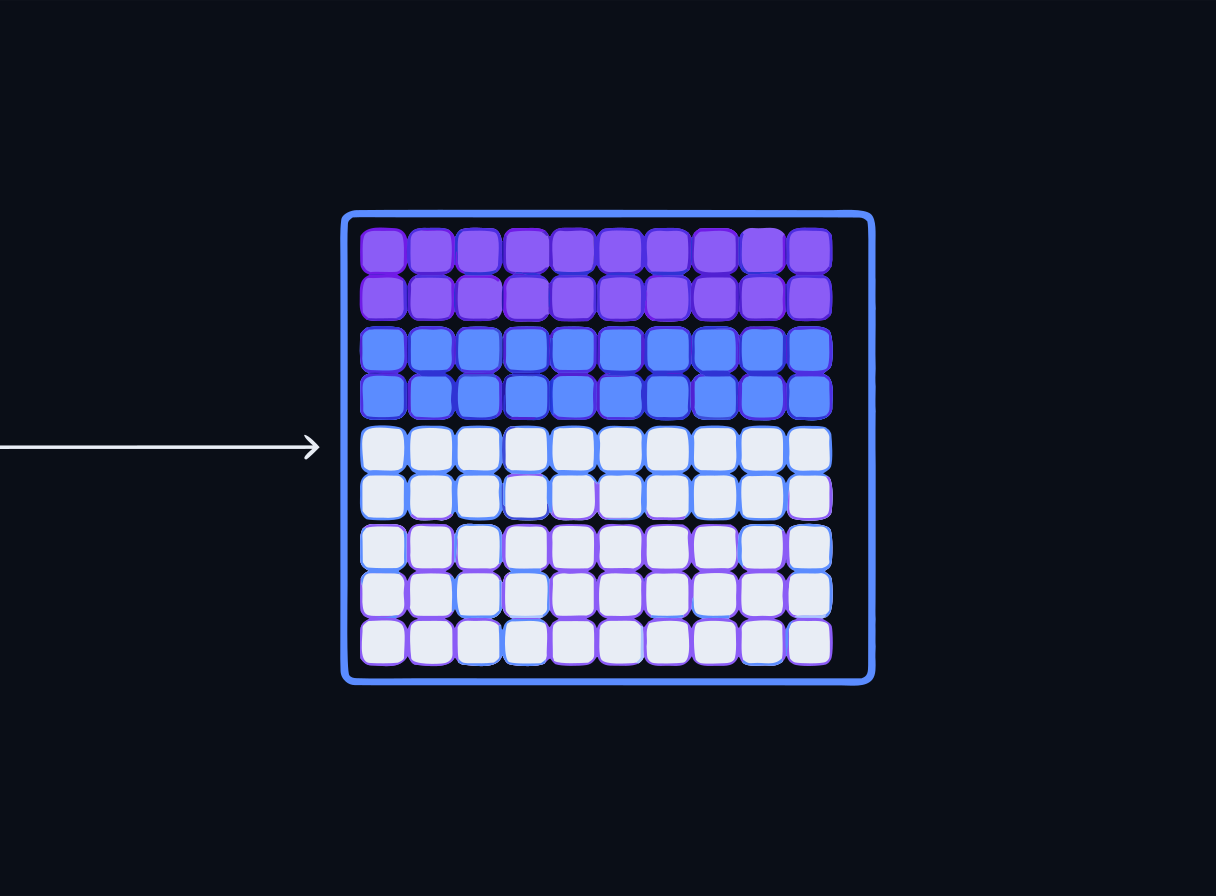
- The maximum number of tokens the model can attend to at once
- Everything — system prompt, user input, retrieved documents, prior turns — must fit inside it
- Nothing outside the window exists as far as the model is concerned
Speaker notes
The context window is the model's entire world at inference time. This sets up the security-lens slide coming shortly: everything in that window is one undifferentiated stream of tokens.
Embeddings
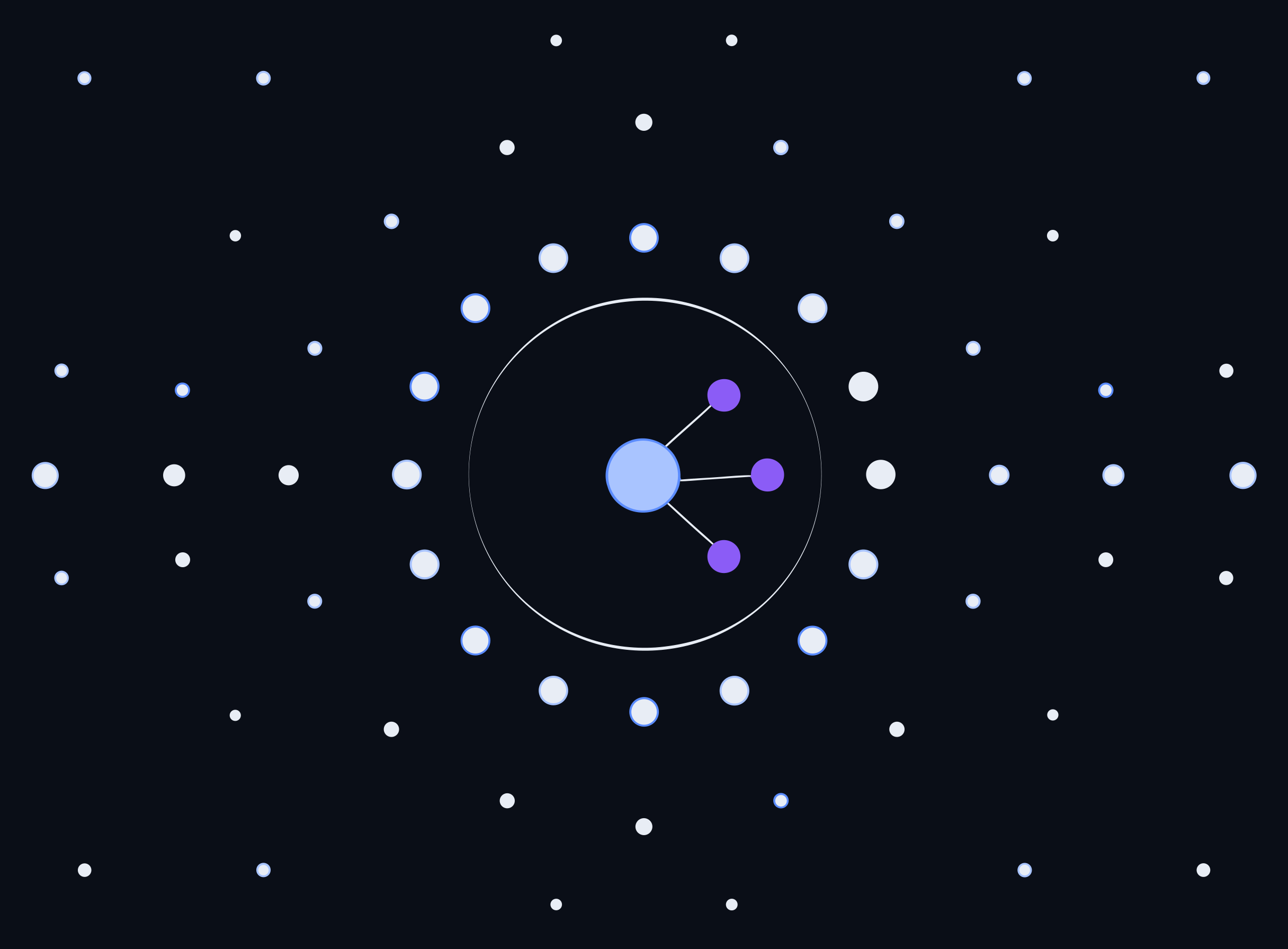
- Every token — and, separately, every chunk of a document — maps to a vector of numbers that captures meaning
- Similar meanings sit CLOSE together in vector space
- "reset my password" and "credential recovery" land near each other despite sharing no words
- This is what makes RAG's similarity search possible
Speaker notes
The geometric intuition is the payoff here: meaning as distance. Point at the circle — that radius is what a similarity search actually returns. In the lab, nomic-embed-text produces these vectors. Semantic similarity is also how attackers find paraphrases that slip past keyword filters.
Attention
- Self-attention lets each token weigh every other token in the context
- The model learns WHICH parts of the context matter for predicting the next token
- This is the mechanism that makes in-context learning (few-shot prompting) work
Speaker notes
Keep this at intuition level: attention = 'every token can look at every other token and decide how much to care.' That is why content placed anywhere in the context — including content an attacker sneaks in — can steer the output.
Autoregressive generation
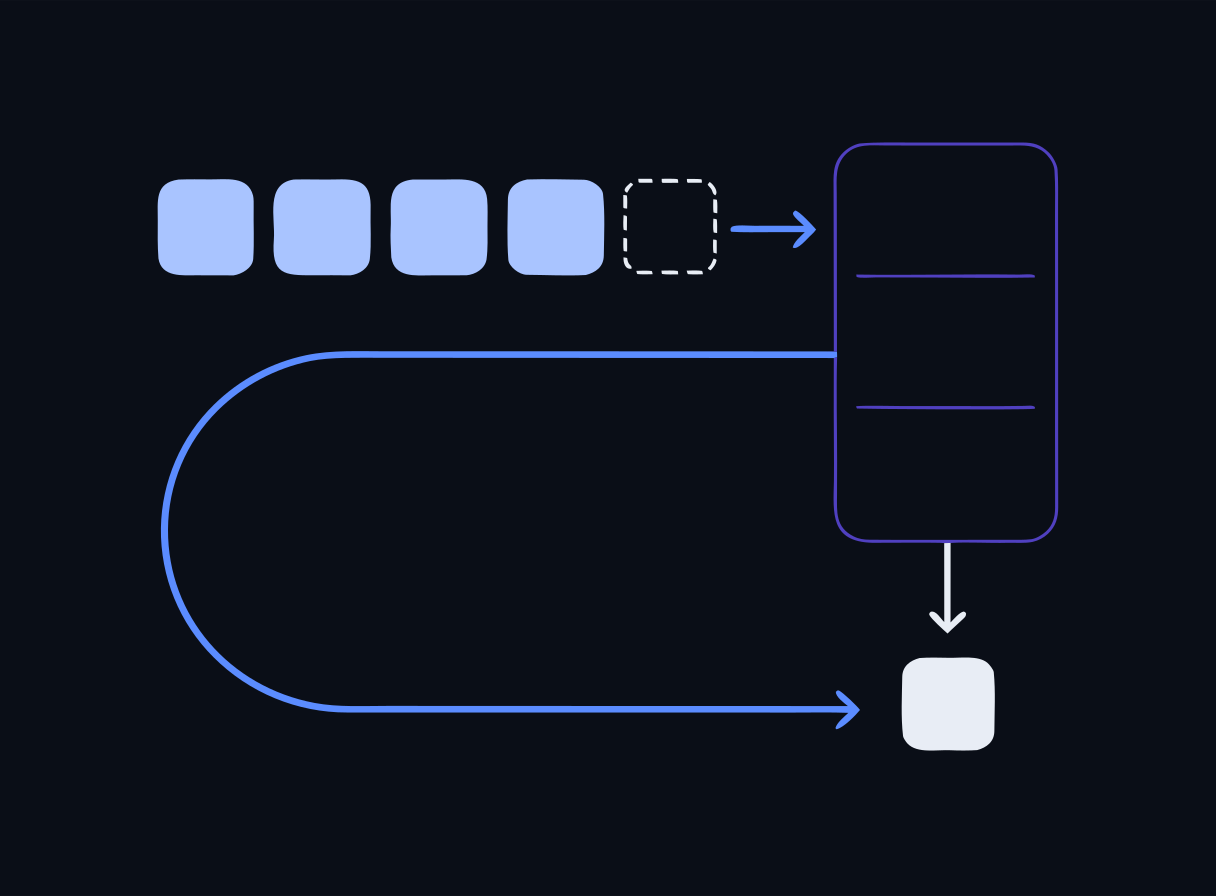
- The model generates ONE token at a time
- Each new token is fed back in as input for the next prediction
- The output is a probabilistic continuation of everything currently in context
- That loop is why prompt content — including injected content — so strongly steers the output
Speaker notes
Draw the loop on a whiteboard if possible: context in → next token out → append → repeat. Once a model starts down a path (helpful or hijacked), each token reinforces the trajectory.
Security lens: it's all one stream of tokens
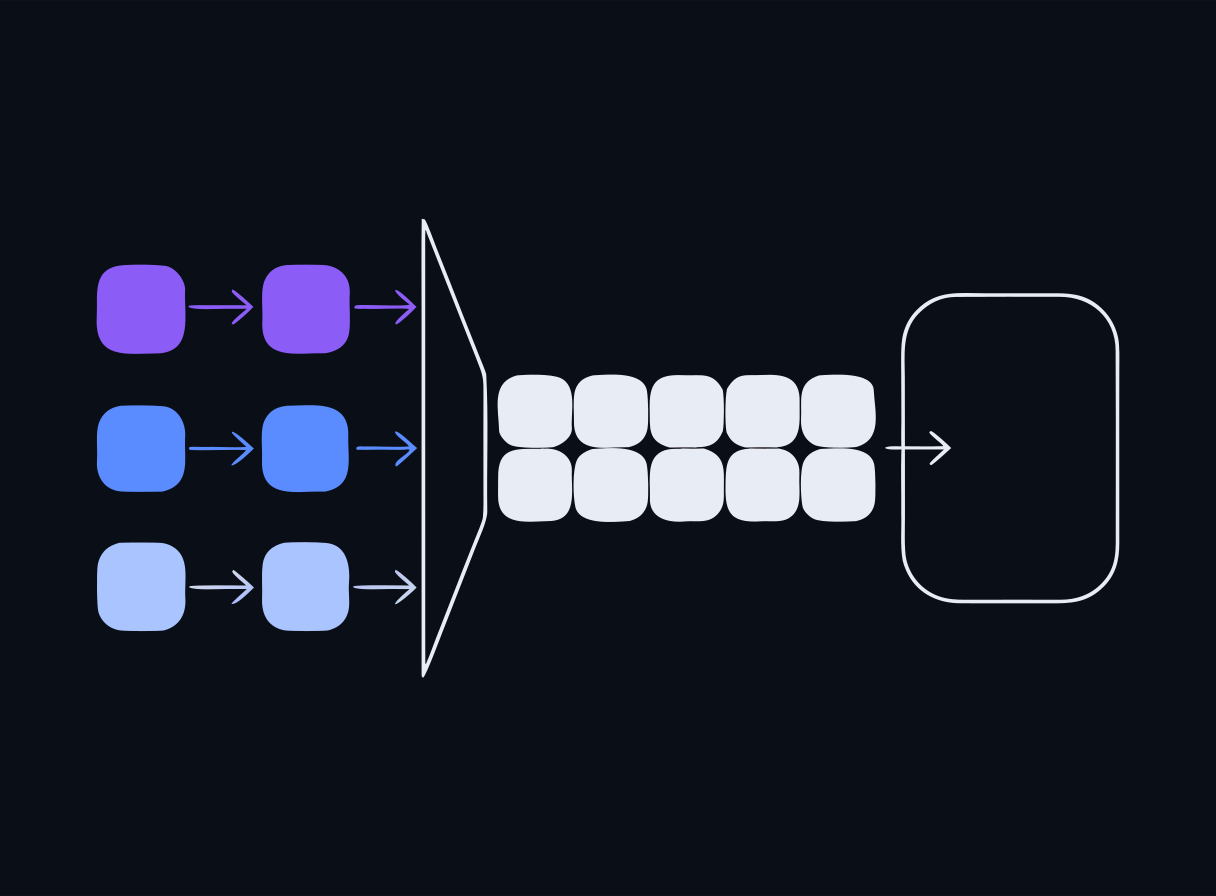
Because the model treats the entire context window as one stream of tokens, it does not inherently distinguish trusted instructions from untrusted data.
- System prompt, user input, retrieved documents — all the same tokens to the model
- That single fact is the root of prompt injection (Day 2)
- …and of data-exfiltration risk (Day 3)
Speaker notes
This is the most important slide of the day. If attendees remember one sentence, it is this one: there is no in-band mechanism separating instructions from data. Every defense we build later is a compensating control for this architectural fact.
Check: the context window
Check for understanding
Why can a document retrieved into an LLM's context steer the model's behavior just like a user instruction can?
- A.Because retrieved documents are digitally signed as trusted
- B.Because the model treats the whole context window as one stream of tokens, with no built-in distinction between instructions and data
- C.Because the vector database rewrites documents into commands
- D.It can't — models only follow the system prompt
Reveal answer
Correct: B. Because the model treats the whole context window as one stream of tokens, with no built-in distinction between instructions and data
The transformer attends over everything in the context window equally — system prompt, user text, and retrieved chunks are all just tokens. That architectural fact is the root cause of both direct and indirect prompt injection.
Speaker notes
If the room gets this one right, the Day 2 injection material will land easily. Option D is the dangerous misconception — the system prompt is influential but not an enforced boundary.
Prompt engineering — programming without training
- Prompting is how you program these models WITHOUT retraining them
- The prompt is your interface: instructions, examples, context, roles
- Small prompt changes can produce large behavior changes — treat prompts like code
Speaker notes
Frame prompts as configuration-as-code: they deserve versioning, review, and testing like any other artifact. That mindset pays off when we harden prompts on Day 2.
Zero-shot prompting
- An instruction with no examples: "Classify this ticket's urgency."
- Fast to write; quality depends entirely on what the model already knows
- Often inconsistent on format and edge cases — especially for small models
Speaker notes
Zero-shot is the baseline attendees will test first in the lab. With a 1.5B model the inconsistency is very visible, which motivates the next slide.
One-shot and multi-shot (few-shot) prompting
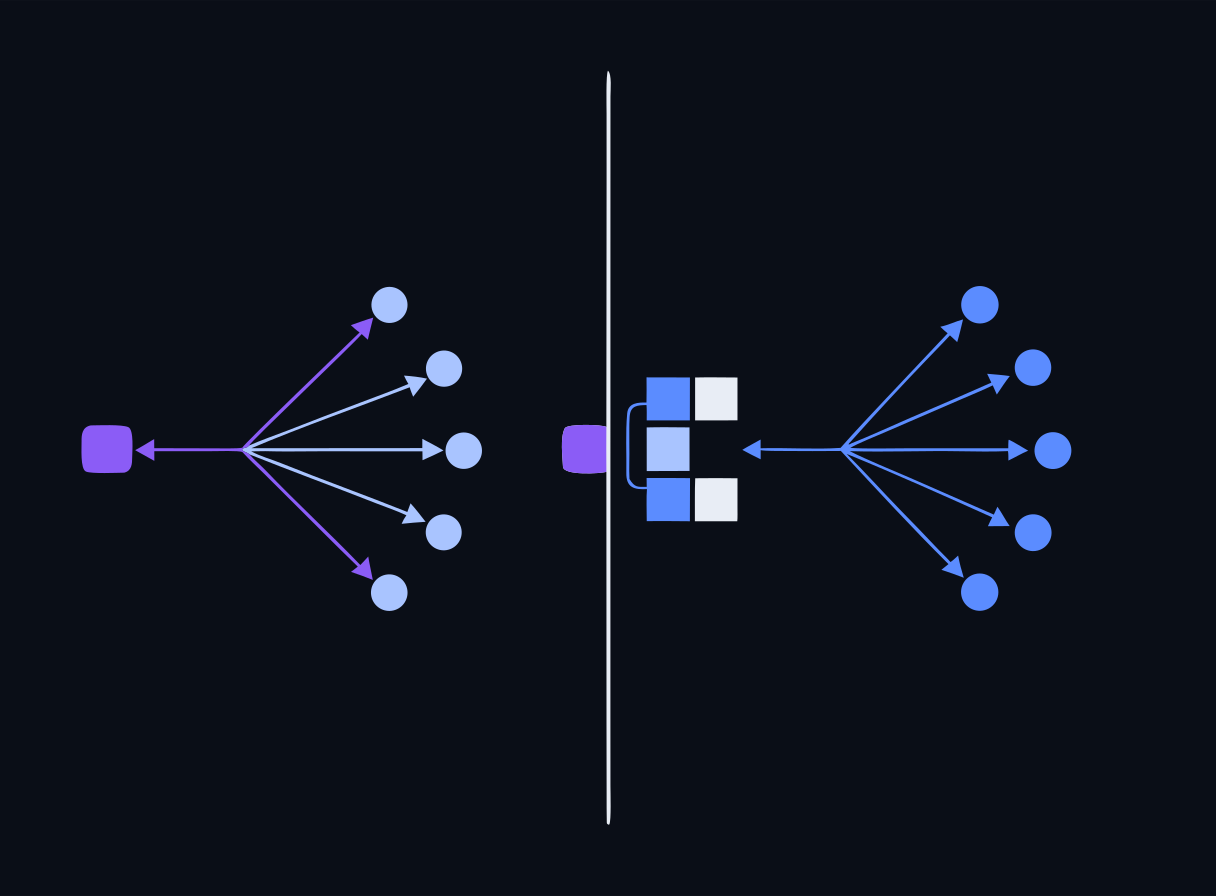
- Include one (one-shot) or several (multi-shot) labeled examples in the prompt
- Output format and accuracy improve markedly
- Examples anchor the model's output format and decision boundary
- This is Experiment A in today's lab
Speaker notes
The classic fix for a model that 'keeps guessing wrong with just an instruction.' Show 2–5 worked examples of the input→label mapping. In the lab, attendees measure the difference on the same tickets with the same model — only the prompt changes.
Chain-of-thought
- Ask the model to reason step by step BEFORE answering
- Helps on multi-step problems
- Costs more tokens and time — use where the task actually needs reasoning
Speaker notes
Demo contrast: a multi-step severity-scoring question with and without 'think step by step.' Note for later: verbose reasoning can also leak internal instructions — a Day 2/3 tie-in.
System vs. user roles
- SYSTEM message — sets durable behavior and guardrails
- USER message — carries the request
- Placing instructions in the system role is STRONGER…
- …but it is NOT an airtight boundary a determined user cannot cross
Speaker notes
The lab demonstrates both halves: role placement measurably changes compliance, AND a crafted user message can still override the system prompt on this model. Guardrails-in-prompt are a control, not a boundary.
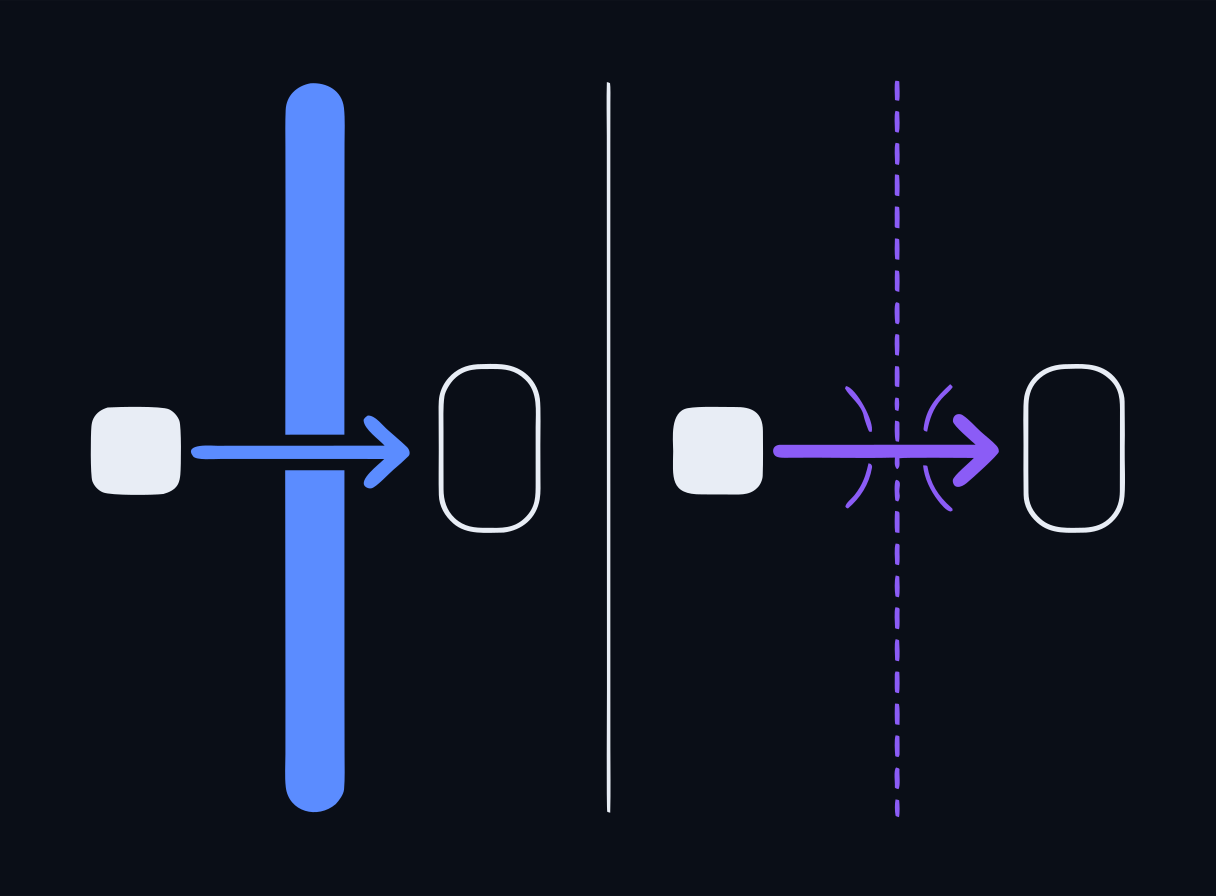
Security lens: roles are advice, not enforcement
- Role separation is convention encoded in training, not an enforced privilege level
- A 'you are a helpful assistant that never reveals X' system prompt is a request, not an ACL
- Defense in depth (Day 2): input scanning, output scanning, and least-privilege around the model
Speaker notes
Map to familiar territory: the system prompt is like a banner on a login screen, not like file permissions. Real enforcement lives OUTSIDE the model — that framing is the entire Day 2 agenda in one sentence.
Check: prompt engineering
Check for understanding
An assistant keeps misclassifying support-ticket urgency when given only an instruction. Which technique most directly improves consistency?
- A.Multi-shot prompting — include several labeled examples in the prompt
- B.Lowering the context window size
- C.Switching from a system role to a user role only
- D.Removing all instructions and letting the model decide
Reveal answer
Correct: A. Multi-shot prompting — include several labeled examples in the prompt
Multi-shot (few-shot) prompting shows the model 2–5 worked examples of the input/label mapping, anchoring its output format and decision boundary far better than a zero-shot instruction alone. This is the Experiment A pattern in the Day 1 lab.
Speaker notes
Same scenario as the end-of-day quiz, seen early — spaced repetition is deliberate. Attendees will verify the answer empirically in the lab within the hour.
RAG: why retrieval-augmented generation exists
- A bare LLM only knows its training data — nothing private, nothing recent
- RAG grounds answers in YOUR retrieved documents
- Adds knowledge the model was never trained on, and reduces hallucination when retrieval is good
- No retraining required
Speaker notes
Position RAG as the default way to put private or fresh data in front of a model. Contrast with fine-tuning: RAG is cheaper, updatable by editing documents, and keeps data in a store you control.
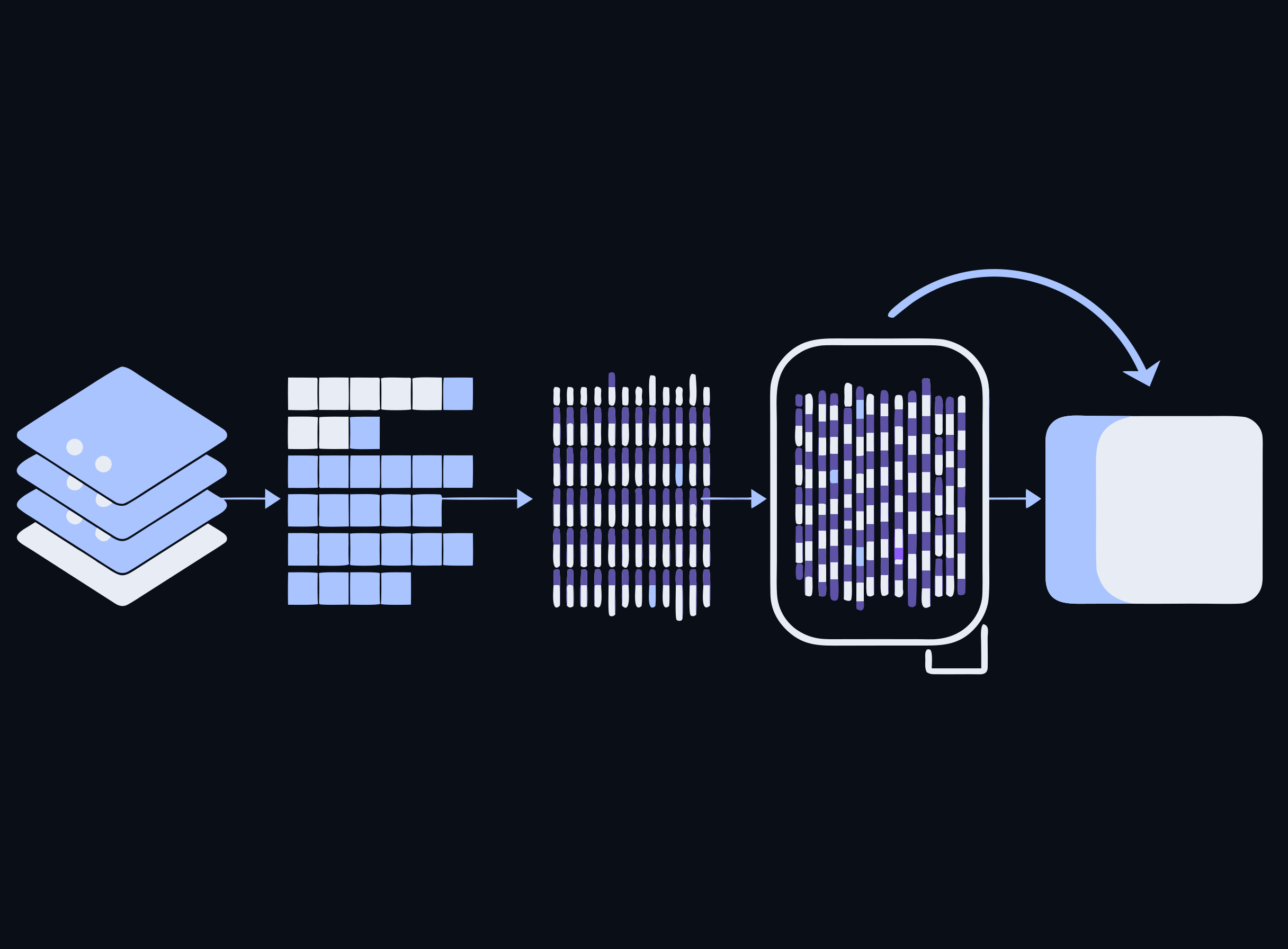
The RAG pipeline — five steps
- 1. Ingest — split documents into chunks
- 2. Embed — turn each chunk into a vector (nomic-embed-text in the lab)
- 3. Store — keep vectors in a vector database (Chroma) with a similarity index
- 4. Retrieve — embed the user's query, fetch the most similar chunks
- 5. Generate — inject those chunks into the prompt so the model answers from real context
Speaker notes
This is the exact pipeline attendees build in the lab this afternoon. Walk each step once here against the diagram, then let the lab make it concrete. Steps 1–3 happen at ingest time; 4–5 at query time — the curved arrow is the query-time hop.
What lives in the vector store
- Numeric embedding vectors of text chunks — used for similarity search at query time
- The query is embedded too; the store returns the chunks whose vectors are most similar (cosine distance)
- That similarity lookup is the "retrieval" in RAG
Speaker notes
Clear up the common misconceptions preemptively: the vector store holds neither model weights nor chat history. It holds chunk vectors (plus the chunk text/metadata for reassembly). This is also quiz material.
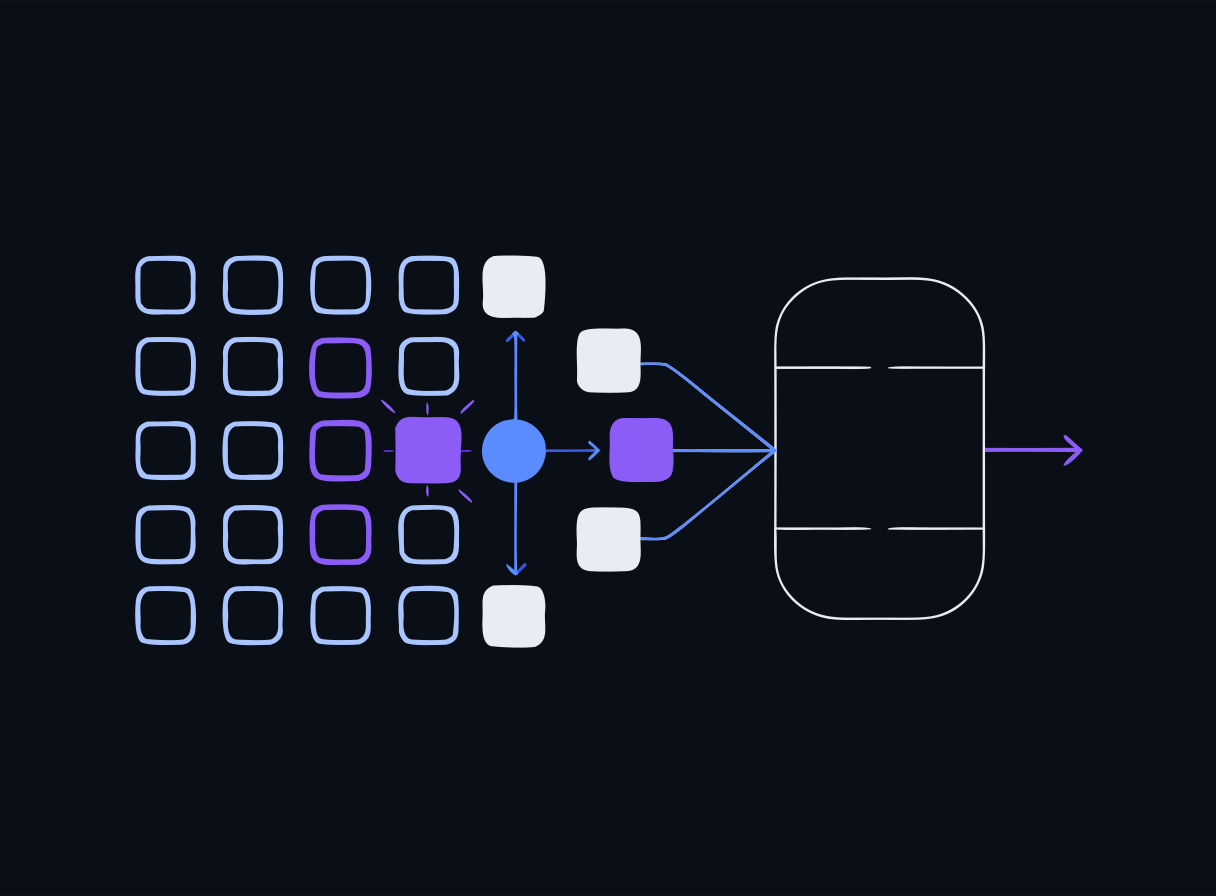
RAG's weak point: retrieval quality
- If the WRONG chunk is fetched, the model faithfully uses it
- If a POISONED chunk is fetched, the model faithfully uses that too
- Garbage (or malice) in → confident answer out
- Preview: Day 2 covers vector and embedding weaknesses, including indirect injection via documents
Speaker notes
End the RAG section on the security note: RAG doesn't just add knowledge, it adds an input channel. Anyone who can write into your corpus can potentially steer your model. That thought should still be echoing tomorrow morning.
Check: RAG
Check for understanding
In a RAG pipeline, what is stored in the vector database?
- A.The full model weights
- B.Plain-text copies of every user's chat history
- C.Numeric embedding vectors of text chunks, used for similarity search at query time
- D.The system prompt only
Reveal answer
Correct: C. Numeric embedding vectors of text chunks, used for similarity search at query time
An embedding model turns each text chunk into a high-dimensional vector. At query time the query is embedded too, and the store (Chroma, in the lab) returns the chunks whose vectors are most similar (cosine distance) — that is the 'retrieval' in RAG.
Speaker notes
Direct reinforcement of the end-of-day quiz question. If anyone picks B, revisit the 'what lives in the vector store' slide — the distinction matters for Day 3's data-governance discussion.
Lab: local Ollama + your first RAG pipeline
Time to build it. The Day 1 lab stands up a local model with Ollama and walks through the full RAG pipeline against a bundled corpus.
- Experiment A — shot prompting: zero-shot vs. multi-shot on the same task
- Experiment B — role placement: system vs. user instructions
- Experiment C — chain-of-thought on a multi-step problem
- Then: ingest → embed → store → retrieve → generate with Chroma + nomic-embed-text
Speaker notes
Send everyone to the Day 1 page lab section (button below). Everyone runs the bundle locally; hand out a cloud VM only where Docker won't cooperate (there are fewer VMs than participants). Budget the full afternoon block; the three prompt experiments are sequenced before the RAG build on purpose.
Go deeper: three focused Day-1 mini-labs
Three more bundles wait on the Day 1 page — each makes one concept from this deck concrete.
- day1-tokenization-embeddings — watch text become tokens, then measure meaning as cosine distance between embedding vectors
- day1-rag-eval-failure — score retrieval hits vs. misses, catch hallucinated answers, and watch one poisoned chunk steer the model
- day1-sampling-ab — sweep temperature/top_p and A/B qwen2.5:1.5b vs. 3b for determinism, quality, and latency
Speaker notes
Position these as catch-up / go-deeper modules: fast finishers start them in the lab block, everyone else can run them after hours — each is self-contained with its own bundle and pre-stage script. Pairings: the tokenization lab reinforces the token/embedding slides, the RAG-eval lab reinforces 'RAG's weak point', and the sampling A/B reinforces the LLM-vs-SLM trade-off. All lab content is DRAFT for instructor review.
The AI lifecycle
- An AI system is more than a model call
- Data is collected and curated → a model is selected or trained → the system is evaluated → deployed → monitored → eventually retired
- Security and governance attach at EVERY stage
- We formalize this with NIST AI RMF on Day 3
Speaker notes
Zoom back out after the lab-focused middle. The lifecycle framing prevents 'AI security = prompt filtering' tunnel vision — data supply chain, evaluation, and monitoring all carry risk. Day 3 gives this a formal vocabulary.
Human-in-the-loop
- A person reviews or approves consequential outputs BEFORE they take effect
- For AI-assisted security work this is non-negotiable
- A generated detection rule, a CVE triage recommendation, a redaction decision — all DRAFTS for a human to confirm
- You will apply this directly in the Day 4 SecOps lab
Speaker notes
Make it concrete: on Day 4, the model generates Sigma rules and the human validates before anything ships. The same principle governs how attendees should use AI in their own courses — the instructor stays the authority.
Shared vocabulary: AI meets security
Watch for terms that mean different things in each field:
- "Model" — an ML artifact vs. a threat model
- "Inference" — running a model vs. deducing sensitive facts
- "Poisoning" — training-data attacks vs. cache/ARP poisoning
- "Signature" — a detection pattern vs. a cryptographic signature
- "Agent" — an autonomous LLM system vs. an endpoint agent
Speaker notes
Run this as a quick round-the-room: ask for the two meanings of each before revealing. Building the glossary now prevents genuine miscommunication when we threat-model AI systems tomorrow.
Day 1 wrap-up
- You can now name the moving parts: tokens, embeddings, attention, autoregression, context window
- You've programmed a model with prompts alone — and seen where role boundaries bend
- You've built a working RAG pipeline, locally, on CPU
- One stream of tokens: the architectural fact behind everything we defend against next
Speaker notes
Recap against the morning's objectives — all six are now covered. Collect open questions for tomorrow's opener.
Before you leave + what's next
- Take the end-of-day quiz on the Day 1 page (self-check, no score recorded)
- Leave your lab environment running if you're on the VM — Day 2 reuses it
- Tomorrow: Day 2 — Securing AI Systems (the 40% domain): OWASP LLM Top 10, prompt injection, guardrails
Speaker notes
Point to the quiz block at the bottom of /day/1. Tease Day 2: everything they learned about context windows and RAG today becomes attack surface tomorrow morning.