AI Foundations + Shared Vocabulary
D1 — Basic AI Concepts (17%)
Learning Objectives
- Define core AI/ML terminology (model, training, inference, embeddings, tokens, context window)
- Explain how large language models work at a high level (transformer architecture, attention, autoregressive generation)
- Differentiate model types (discriminative vs. generative, encoder-only vs. decoder-only vs. encoder-decoder)
- Demonstrate prompt-engineering techniques (zero-shot, one-shot, multi-shot, chain-of-thought, system vs. user roles)
- Build a simple RAG pipeline with a local Ollama model and a vector store
- Identify shared vocabulary between AI and cybersecurity domains
Lecture Notes
Where we are going today
Day 1 builds the shared vocabulary every later day depends on. By lunch you can name the moving parts of a modern AI system; by the end of the lab you have stood up a local model and built a working RAG pipeline on your own machine. Everything runs locally on CPU with Ollama — no data leaves the laptop, which is also the security posture we care about all week.
Types of AI, and where LLMs sit
“AI” is an umbrella. It helps to place today’s tools on the map:
- Rule-based / symbolic AI — explicit human-written logic. Deterministic, auditable, brittle.
- Classical machine learning — models that learn patterns from labeled data (spam filters, fraud scoring).
- Deep learning — neural networks with many layers; the basis for modern language and vision models.
- Generative AI — models that produce new content (text, code, images). Large language models are the generative-text branch and the focus of this course.
A useful cut for security work is discriminative vs. generative: a discriminative model answers “which class is this?” (the DeBERTa prompt-injection classifier you meet on Day 2), while a generative model answers “what comes next?” (the LLM itself).
LLM vs. SLM
Same idea, different scale. Large language models (frontier, hundreds of billions of parameters) reason and recall broadly but need serious hardware. Small language models (1-3B parameters, like qwen2.5:1.5b) fit in laptop RAM and run on CPU — perfect for a classroom — at the cost of some capability. Choosing the smallest model that reliably does the job is a recurring theme (it returns on Day 4, where tool-calling forces us up to a 3B model).
How a language model actually works
Modern LLMs are transformers. Three ideas are enough to reason about them securely:
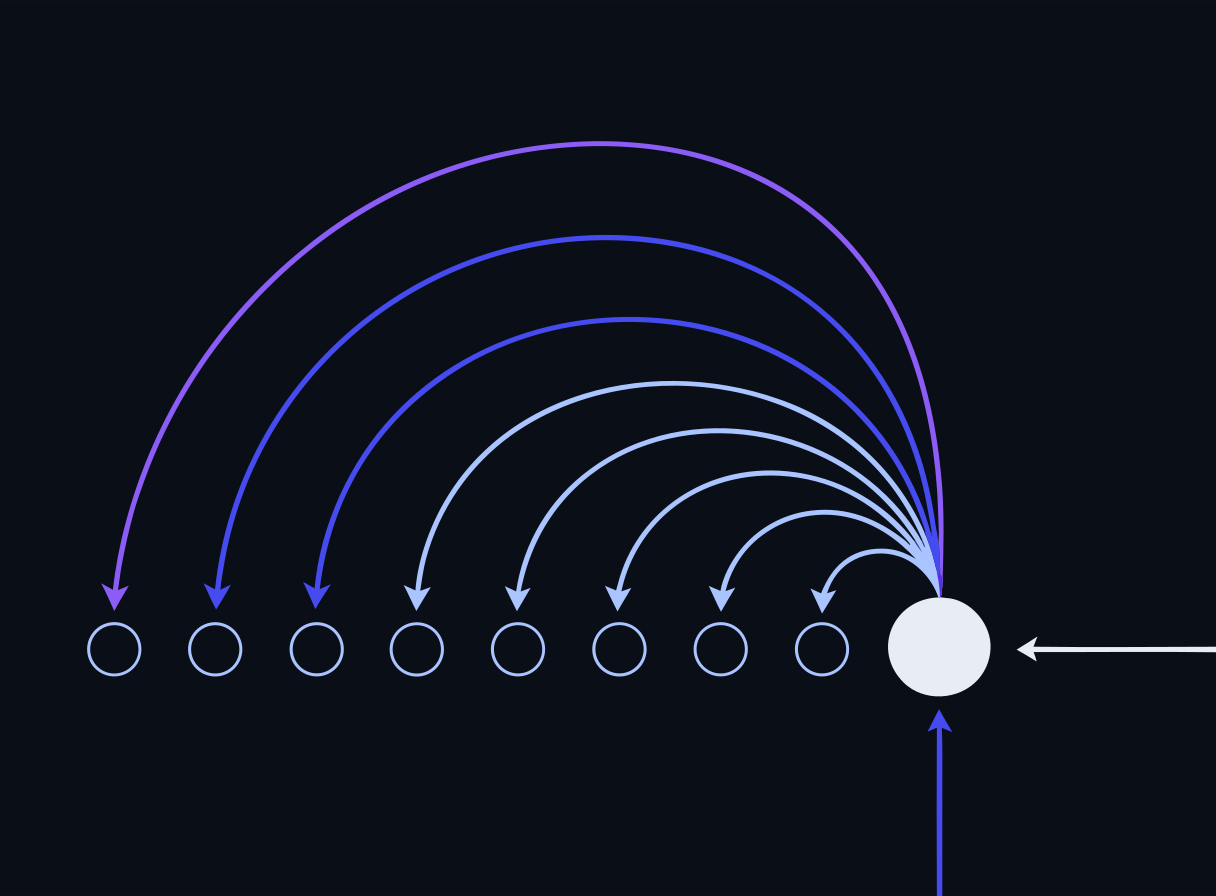 Every token can weigh every other token
- Tokens — text is chopped into sub-word tokens; the model reads and writes tokens, not characters. The context window is the maximum number of tokens it can attend to at once.
- Embeddings — every token (and, separately, every chunk of a document) is mapped to a vector of numbers that captures meaning. Similar meanings sit close together in vector space. This is what makes RAG’s similarity search possible.
- Attention + autoregressive generation — the transformer’s self-attention lets each token weigh every other token in context; the model then generates one token at a time, feeding its own output back in. That autoregressive loop is why prompt content — including injected content — so strongly steers the output.
Security lens Because the model treats the entire context window as one stream of tokens, it does not inherently distinguish “trusted instructions” from “untrusted data.” That single fact is the root of prompt injection (Day 2) and data-exfiltration risk (Day 3).
Prompt engineering
Prompting is how you program these models without training them.
- Zero-shot — an instruction with no examples (“Classify this ticket’s urgency”).
- One-shot / multi-shot (few-shot) — include one or several labeled examples; output format and accuracy improve markedly.
- Chain-of-thought — ask the model to reason step by step before answering; helps on multi-step problems.
- System vs. user roles — the system message sets durable behavior and guardrails; the user message carries the request. Placing instructions in the system role is stronger, but — as the lab demonstrates — it is not an airtight boundary a determined user cannot cross.
The Day 1 lab’s three experiments (shot prompting, role placement, chain-of-thought) let you feel each of these effects on the same local model.
RAG and vector stores
Retrieval-Augmented Generation grounds a model in your documents:
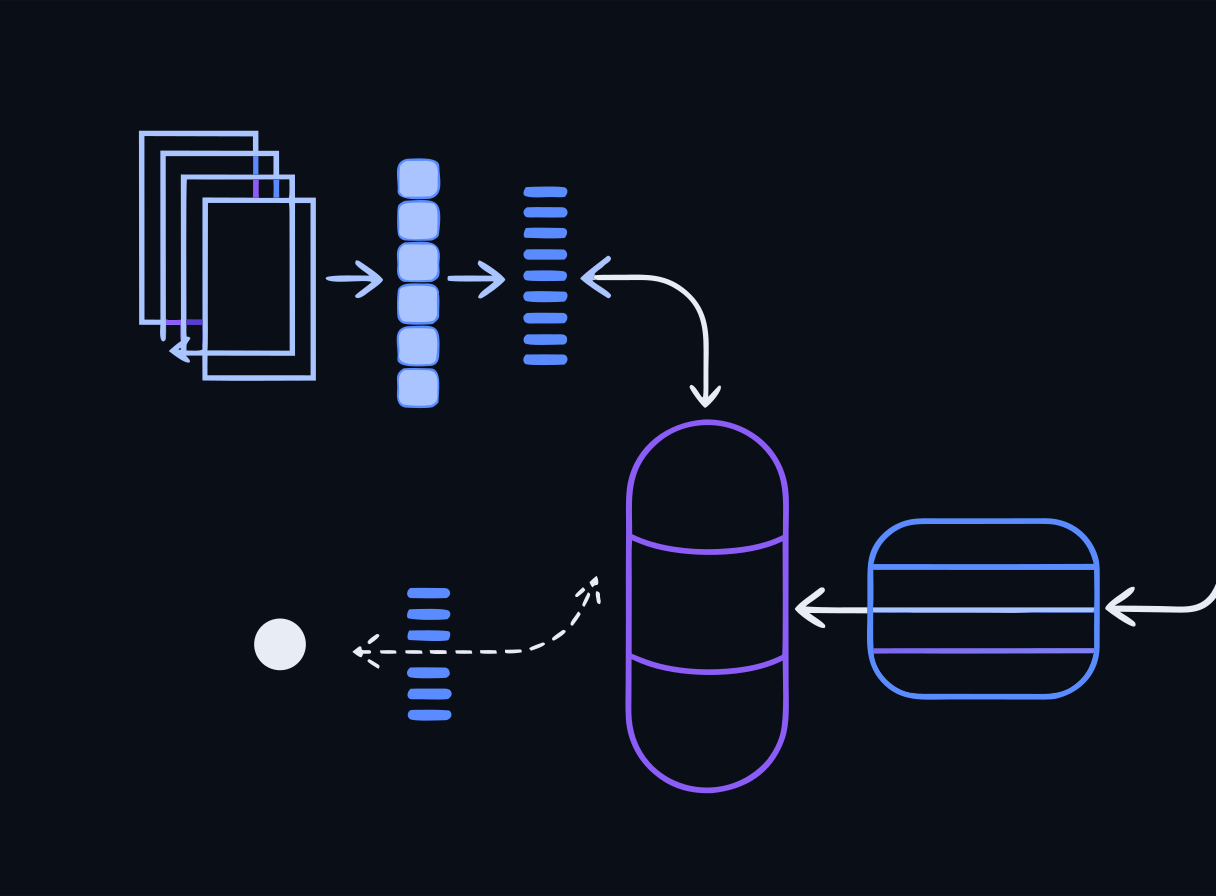 Ingest-time path vs. query-time path
- Ingest — split documents into chunks.
- Embed — turn each chunk into a vector with an embedding model (
nomic-embed-textin the lab). - Store — keep the vectors in a vector database (Chroma) with a similarity index.
- Retrieve — embed the user’s query, fetch the most similar chunks.
- Generate — inject those chunks into the prompt so the model answers from real context.
RAG adds knowledge and cuts hallucination without retraining, which is why it is the default way to put private or fresh data in front of a model. Its weak point is retrieval quality: if the wrong chunk (or a poisoned one) is fetched, the model faithfully uses it — a preview of the Day 2 discussion on vector and embedding weaknesses.
The AI lifecycle and human-in-the-loop
An AI system is more than a model call. Data is collected and curated, a model is selected or trained, the system is evaluated, deployed, monitored, and eventually retired. Security and governance attach at every stage (we formalize this with NIST AI RMF on Day 3).
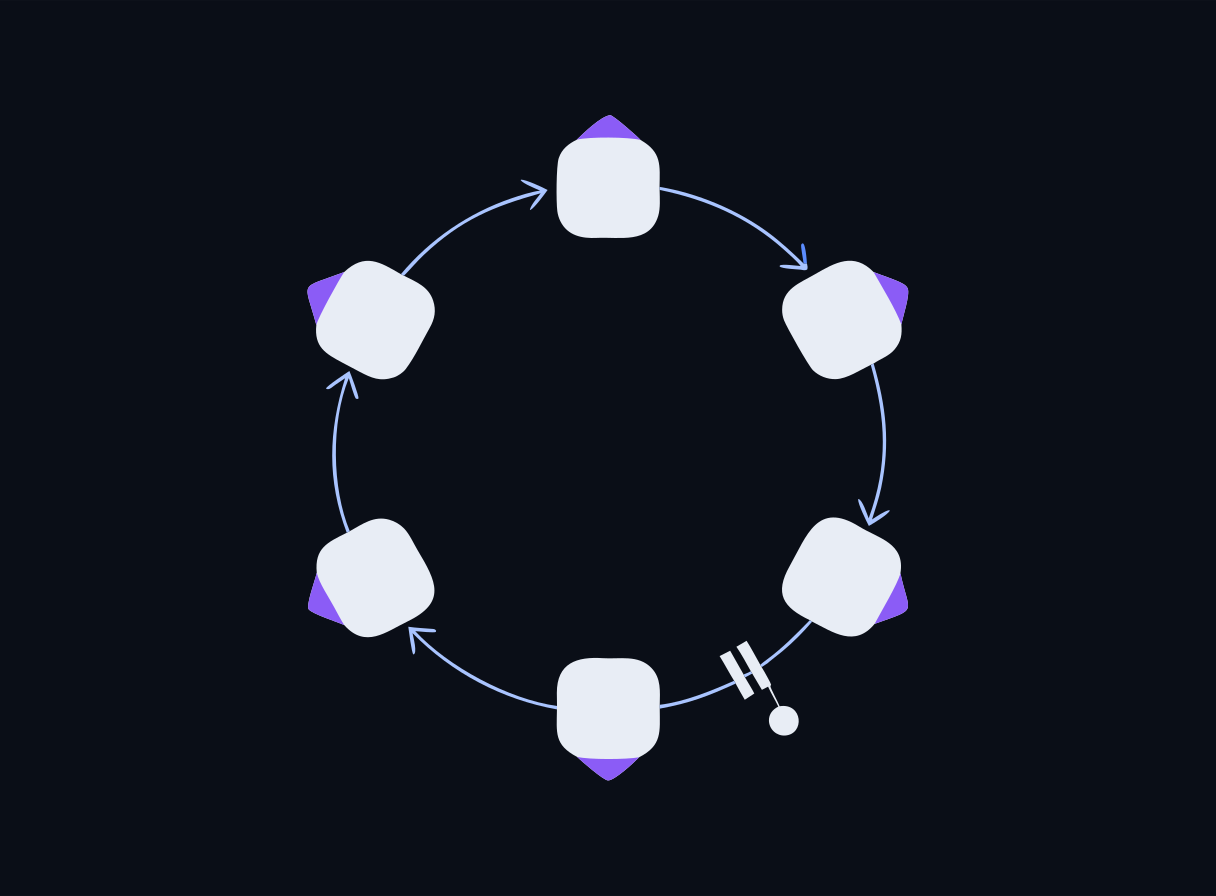 A closed lifecycle with a human approval gate
Human-in-the-loop means a person reviews or approves consequential outputs before they take effect. For AI-assisted security work this is non-negotiable: a generated detection rule, a CVE triage recommendation, or a redaction decision is a draft for a human to confirm — a principle you will apply directly in the Day 4 SecOps lab.
Shared vocabulary: AI meets security
Watch for terms that mean different things in each field — “model,” “inference,” “poisoning,” “signature,” “agent.” Building a common glossary now prevents miscommunication when we start threat-modeling AI systems tomorrow.
Labs
Run these on your own laptop in AnythingLLM or LM Studio — no containers. Each is a full stepped guide with copy-ready prompts and a small data pack. New to the tools? The Labs without Docker page opens with a one-time setup.
Build a RAG workspace over a document set
Stand up a working retrieval-augmented generation pipeline and see grounded answers cite their sources.
Break your RAG pipeline on purpose
Make RAG failure modes measurable: retrieval miss, hallucination under low similarity, and indirect prompt injection through a poisoned document.
Tokens: count them, break them, budget them
See text become tokens, understand why token counts differ by content type and model, and connect tokens to both cost and the context window.
Sampling parameters and a model A/B
Turn "the model felt random / slow / dumb" into numbers you can defend: determinism versus temperature, and size versus speed on your own hardware.
Docker reference — 4 original bundlesThe reproducible container versions these mirror, and the exam environment. Optional.
Lab Bundle: day1-foundations-ollama-rag
The reproducible container version of this lab — the exam is built on it, and it's a copy you can take back to your own classroom. The GUI labs above are the hands-on path in class; reach for this when you want the exact reference stack. Cloud VMs are a limited fallback if Docker won't cooperate. Verify the checksum before extracting.
Verify checksum (optional)
# Windows (PowerShell) — compare against the .sha256 file
Get-FileHash day1-foundations-ollama-rag.zip -Algorithm SHA256

# macOS
shasum -a 256 -c day1-foundations-ollama-rag.zip.sha256

# Linux
sha256sum -c day1-foundations-ollama-rag.zip.sha256
Docker not cooperating? There areGUI versions of the Day-1 labs that run in AnythingLLM or LM Studio instead — same objectives, no container stack.
Run locally with Docker (recommended)
# 1. Extract the bundle you downloaded above
#    Windows: right-click the .zip -> "Extract All", or in PowerShell:
#      Expand-Archive day1-foundations-ollama-rag.zip -DestinationPath .
#    macOS: double-click it. Linux: unzip day1-foundations-ollama-rag.zip
cd day1-foundations-ollama-rag

# 2. Start the lab environment
docker compose up -d

# 3. Follow the lab README for the exercise steps
cat README.md
Or run on a cloud VM (limited — ask if you need one)
There are fewer VMs than participants, so they go to people whose local Docker isn't working. Your instructor sends you an IP and a password directly.
# 1. Connect (password auth — no key file needed)
ssh workshop@<your-vm-ip>

# 2. Everything is pre-staged here
cd /opt/secai

# 3. Run a lab (the login message lists every Day-1 command)
docker compose -f vm/docker-compose.yml --profile run run --rm \
  day1-runner python app/rag_pipeline.py
The VM runs the golden compose (vm/docker-compose.yml) with every lab pre-staged and all images and models pre-pulled — no internet needed during the workshop.
Lab Bundle: day1-tokenization-embeddings
The reproducible container version of this lab — the exam is built on it, and it's a copy you can take back to your own classroom. The GUI labs above are the hands-on path in class; reach for this when you want the exact reference stack. Cloud VMs are a limited fallback if Docker won't cooperate. Verify the checksum before extracting.
Verify checksum (optional)
# Windows (PowerShell) — compare against the .sha256 file
Get-FileHash day1-tokenization-embeddings.zip -Algorithm SHA256

# macOS
shasum -a 256 -c day1-tokenization-embeddings.zip.sha256

# Linux
sha256sum -c day1-tokenization-embeddings.zip.sha256
Docker not cooperating? There areGUI versions of the Day-1 labs that run in AnythingLLM or LM Studio instead — same objectives, no container stack.
Run locally with Docker (recommended)
# 1. Extract the bundle you downloaded above
#    Windows: right-click the .zip -> "Extract All", or in PowerShell:
#      Expand-Archive day1-tokenization-embeddings.zip -DestinationPath .
#    macOS: double-click it. Linux: unzip day1-tokenization-embeddings.zip
cd day1-tokenization-embeddings

# 2. Start the lab environment
docker compose up -d

# 3. Follow the lab README for the exercise steps
cat README.md
Or run on a cloud VM (limited — ask if you need one)
There are fewer VMs than participants, so they go to people whose local Docker isn't working. Your instructor sends you an IP and a password directly.
# 1. Connect (password auth — no key file needed)
ssh workshop@<your-vm-ip>

# 2. Everything is pre-staged here
cd /opt/secai

# 3. Run a lab (the login message lists every Day-1 command)
docker compose -f vm/docker-compose.yml --profile run run --rm \
  day1-runner python app/rag_pipeline.py
The VM runs the golden compose (vm/docker-compose.yml) with every lab pre-staged and all images and models pre-pulled — no internet needed during the workshop.
Lab Bundle: day1-rag-eval-failure
The reproducible container version of this lab — the exam is built on it, and it's a copy you can take back to your own classroom. The GUI labs above are the hands-on path in class; reach for this when you want the exact reference stack. Cloud VMs are a limited fallback if Docker won't cooperate. Verify the checksum before extracting.
Verify checksum (optional)
# Windows (PowerShell) — compare against the .sha256 file
Get-FileHash day1-rag-eval-failure.zip -Algorithm SHA256

# macOS
shasum -a 256 -c day1-rag-eval-failure.zip.sha256

# Linux
sha256sum -c day1-rag-eval-failure.zip.sha256
Docker not cooperating? There areGUI versions of the Day-1 labs that run in AnythingLLM or LM Studio instead — same objectives, no container stack.
Run locally with Docker (recommended)
# 1. Extract the bundle you downloaded above
#    Windows: right-click the .zip -> "Extract All", or in PowerShell:
#      Expand-Archive day1-rag-eval-failure.zip -DestinationPath .
#    macOS: double-click it. Linux: unzip day1-rag-eval-failure.zip
cd day1-rag-eval-failure

# 2. Start the lab environment
docker compose up -d

# 3. Follow the lab README for the exercise steps
cat README.md
Or run on a cloud VM (limited — ask if you need one)
There are fewer VMs than participants, so they go to people whose local Docker isn't working. Your instructor sends you an IP and a password directly.
# 1. Connect (password auth — no key file needed)
ssh workshop@<your-vm-ip>

# 2. Everything is pre-staged here
cd /opt/secai

# 3. Run a lab (the login message lists every Day-1 command)
docker compose -f vm/docker-compose.yml --profile run run --rm \
  day1-runner python app/rag_pipeline.py
The VM runs the golden compose (vm/docker-compose.yml) with every lab pre-staged and all images and models pre-pulled — no internet needed during the workshop.
Lab Bundle: day1-sampling-ab
The reproducible container version of this lab — the exam is built on it, and it's a copy you can take back to your own classroom. The GUI labs above are the hands-on path in class; reach for this when you want the exact reference stack. Cloud VMs are a limited fallback if Docker won't cooperate. Verify the checksum before extracting.
Verify checksum (optional)
# Windows (PowerShell) — compare against the .sha256 file
Get-FileHash day1-sampling-ab.zip -Algorithm SHA256

# macOS
shasum -a 256 -c day1-sampling-ab.zip.sha256

# Linux
sha256sum -c day1-sampling-ab.zip.sha256
Docker not cooperating? There areGUI versions of the Day-1 labs that run in AnythingLLM or LM Studio instead — same objectives, no container stack.
Run locally with Docker (recommended)
# 1. Extract the bundle you downloaded above
#    Windows: right-click the .zip -> "Extract All", or in PowerShell:
#      Expand-Archive day1-sampling-ab.zip -DestinationPath .
#    macOS: double-click it. Linux: unzip day1-sampling-ab.zip
cd day1-sampling-ab

# 2. Start the lab environment
docker compose up -d

# 3. Follow the lab README for the exercise steps
cat README.md
Or run on a cloud VM (limited — ask if you need one)
There are fewer VMs than participants, so they go to people whose local Docker isn't working. Your instructor sends you an IP and a password directly.
# 1. Connect (password auth — no key file needed)
ssh workshop@<your-vm-ip>

# 2. Everything is pre-staged here
cd /opt/secai

# 3. Run a lab (the login message lists every Day-1 command)
docker compose -f vm/docker-compose.yml --profile run run --rm \
  day1-runner python app/rag_pipeline.py
The VM runs the golden compose (vm/docker-compose.yml) with every lab pre-staged and all images and models pre-pulled — no internet needed during the workshop.
End-of-Day Quiz
Check for understanding — reveal the answer after you've chosen. No score is recorded.
In this workshop, what is the practical difference between a large language model (LLM) and a small language model (SLM) like the qwen2.5:1.5b model used in the lab?
Reveal answer
Correct: B. SLMs have far fewer parameters, so they run on CPU-only laptops but trade away some reasoning and world-knowledge capability
Size (parameter count) is the defining axis. A 1.5B-parameter SLM fits in laptop RAM and runs on CPU, but a frontier LLM (hundreds of billions of parameters) reasons and recalls facts more reliably. Both are typically decoder-only transformers — the architecture is the same, the scale is not.
What problem does Retrieval-Augmented Generation (RAG) solve that a bare LLM prompt does not?
Reveal answer
Correct: C. It grounds answers in your own retrieved documents, reducing hallucination and adding knowledge the model was never trained on
RAG embeds your corpus into a vector store, retrieves the chunks most similar to the query, and injects them into the prompt as context. The model answers from that context — no retraining needed — which both adds fresh/private knowledge and reduces hallucination when retrieval is good.
You want an assistant to classify support tickets as High/Medium/Low urgency and it keeps guessing wrong with just an instruction. Which prompt-engineering technique most directly improves consistency?
Reveal answer
Correct: B. Multi-shot prompting — include several labeled examples in the prompt
Multi-shot (few-shot) prompting shows the model 2-5 worked examples of the input/label mapping, which anchors its output format and decision boundary far better than a zero-shot instruction alone. This is the Experiment A pattern in the Day 1 lab.
In a RAG pipeline, what is stored in the vector database?
Reveal answer
Correct: D. Numeric embedding vectors of text chunks, used for similarity search at query time
An embedding model turns each text chunk into a high-dimensional vector. At query time the query is embedded too, and the store (Chroma, in the lab) returns the chunks whose vectors are most similar (cosine distance) — that is the 'retrieval' in RAG.